Quantcast
Channel: Dynamics 365 FO / AX - thoughts on application development and customizations
Viewing all 54 articles
Browse latest View live

Don't override the tabChange-method on a tab.

$
0
0
Working on a Dynmics AX 4.0, I learned today (from a wizard-level colleague), that overriding the tabChange-method on a tab in a form in Dynamic AX/Axapta, disallows the usersetup of the tab and all of it's children.

My problem was that a customer complained that they were not able to make a user setup of the form and add fields to a tab and all tabpages below that tab on the PurchTable-form.

The customization:

public boolean tabChange(int fromTab)
{
boolean ok;
;

ok = super(fromTab);

if (ok)
purchTable_ds.lastJournals();

return ok;
}

had been added to the tab.

Seing that the method call

PurchTable_ds.lastJournals();

was present in
pageActivated-method on the tabpage TabHeaderPostings in the SYS-layer (!),
I decided to remove the above customization.

Refreshing (executeQuery) a calling form from the called form.

$
0
0
A feature that you often need when you work with code that is called from a form and manipulates data, is to be able to refresh the calling form to reflect the changes made, when the code has been run.

This could also be a form calling an other form, where data changes are made, in the called form, but the changes must be reflected in the calling form, when the called form is closed.

I have seen it done by making call back to a method on the calling form, that does the refresh.

You can however make the refresh from the CALLED form or code, using an args-object.

When a form calls an other form it is typically done via a menu item, and thus automatically an args object is passed to the called form.

The args object can carry a tablebuffer object that is acessed with the record method on the args object.

You can determine if the tablebuffer object is a formDataSource, and if so, you can instantiate a formDataSource-object on which you call the executeQuery-metod.

One example could be:

Form SalesTable
has a menuitembutton that calls Form SalesLine.

Form SalesTable has a display method that sums up data manipulated in Form SalesLine.
When closing form SalesLine we need Form SalesLine to re-execute the query in Form SalesTable and thus refreshing the data form SalesTable is showing.

This can be done by overriding the close method on Form SalesLine and putting the following code into it:

public void close()
{
FormDataSource fds; // Form data source object
SalesTable salesTable; // tablebuffer passed in args object

super();
// Refresh calling form data source
salesTable = element.args().record();
if (salesTable.isFormDataSource())
{
fds = salesTable.dataSource();
if (fds)
{
fds.executeQuery();
}
}
}

The above shown can also be used in a main-method on a class, so that code in the class that manipulates data shown in a form, where the class is called via a menu-button on the form.

I thought of doing it with a common object, and putting the code in a method on the GLOBAL class, to make it useable everywhere from a single line of code, but the Axapta client (3.0) kept crashing when calling common.dataSource() :0(.

Formatting real-controls i AX reports using x++ code

$
0
0
I was asked by a (danish) client if Dynamics AX could format amount fields according to lanaguage code of the customer.

The problem arises as the danish format for amounts is:
999.999.999,99

That is thousand separators are the dot-sign and decimal separator is the comma-sign,

and the english format is
999,999,999.99

That is thousand separators are the comma-sign and decimal separator is the dot-sign.

Now the Ax client is able to run in several language of course, but this also imposes the regional settings on any reports printed.
Thus if you run the AX client with danish language and prints an invoice for an english customer, all amounts will be printed using danish formatting.

I wrote a small class that builds a list of all real-controls in a report. You can then feed it a langauge code and it will traverse the list of controls and format them accordingly.

Thus we can now batch invoice customers and get invoices printed where amounts are formatted according to the language code of the customer. :0)

Finding differences in code layers between installation

$
0
0
When working with customizations in Dynamics AX I consider it best practice to have several installations for the same customer.

At a minimum you should have a development environment, a development test environment, a test environment besides the production environment that the customer runs in daily business.

DEV.
The development environment is for hacking away, developing and doing research and experiments.

DEV TEST.
The development test environment is for testing the customizations (inhouse QA) before releasing it to the customer for test.
The transfer of customizations between DEV and DEV TEST is done by exporting and
importing .xpo-files.


TEST.
The TEST environment is where the customer makes acceptance test of customizations.
The transfer of code to the TEST enviroment is preferably done by copying layer (.aod)-files from the DEV TEST to the TEST, allowing for release/build control.
If successive deliveries must be done, this can be again be done by exporting importing code AS LONG AS YOU ENSURE EXPORTING AND IMPORTING IS DONE WITH ID'S AND LABELS using an outer layer.

By doing the above described, you avoid having ID-conflicts, when doing RELEASE-upgrades.
A release/buld can the be delivered by copying the .aod and label-files from the DEV TEST to the TEST, and deleting outer layers where successive test-deliveries have been made. Thus when you deliver a release/build you have all customizations rolled up in the layer you use for release.

PRODUCTION.
When making a delivery to the production environment, this is preferably done by delivering layer-files. Again succesive deliveries for hotfixes can be done, by observing the above mentioned rules for the TEST environment (exporting / importing with ID'S and LABELS).


When working as a consultant you are sometimes challenged by having to take over a customer from someone else.
It can become even more challenging, if your predecessors have not been taking the above best pratice rules in to consideration, and you have doubts if the environments TEST and PRODUCTION are in synchronization.
Of course if recently deliveries have been made for test by the customer they wouldn't be.

But some times hotfixes are made directly in the production, and not carried back to the DEV and DEV TEST environments thus leaving the risk that the hotfix will be overwritten by a new release from the DEV TEST to TEST and further on from TEST to PRODUCTION.

I recently had this situation happen to me, and needed to get an overview of the differences between the layers in TEST and PRODUCTION.
Best practice was not followed in this case, so no DEV and DEV TEST enviroments were present, and hotfixes had been made directly in the production.

So I took the layers from the production environment and copied them to the appl / old folder under the TEST enviroment, and used a litte job to build a list of the differences.

Using this list, I was able to pull the code from the PRODUCTION missing in the TEST environment to the TEST environment, so that a release from the test environment weas made.

Se code below:


static void UtilElementsFindDiffInLayers(Args _args)
{
UtilElements newElement;
UtilElements uppElement;
UtilElementsOld oldElements;
UtilElements delElement;
UtilElementType type;
UtilEntryLevel level = UtilEntryLevel::cus;
Container types = [UtilElementType::TableInstanceMethod, UtilElementType::TableStaticMethod, UtilElementType::ClassInstanceMethod, UtilElementType::ClassStaticMethod];
UtilElementId uid = 0; //ClassNum(SysTableBrowser); // init UID if running on specific element
if running on specific element
boolean testMode = false; // TRUE to only test
Counter i;

type = conpeek(types,i);
while select newElement
order by utilLevel
where newElement.utilLevel > UtilEntryLevel::dip &&
(newElement.parentId == uid || !uid)
join oldElements
where oldElements.utilLevel == newElement.utilLevel
&& oldElements.name == newElement.name
&& oldElements.recordType == newElement.recordType
&& oldElements.parentId == newElement.parentId
{
if (oldElements.source != newElement.source)
{
info(strfmt("Layer: %1 Difference: %2 %3.%4",enum2str(newElement.utilLevel),global::enum2Value(oldElements.recordType),xUtilElements::parentName(newElement),oldElements.name));
}
}
}


ATTENTION: As always - USE CODE AT OWN RISK.

Dynanics AX - WTF ?

$
0
0
Try the following job in Dynamics AX:

static void Job16(Args _args)
{;
info(conPeek(new HeapCheck().createAContainer(), 4));
}

I've tested it in Dynamics AX 2009 and Axapta 3.0, so I guess it would work in Dynamics AX 4.0 also.

Translated from danish the result reads:

"Hi mum, heres comes a buffer"

An AX easter egg. :)

2012.11.07 - Update:
Just tried the same "fun" job in Dynamics AX 2012.
It seems that the good people at Microsoft have been reviewing some of the old kernal functions, as the result of running the above mentioned is now:

"buffer buffer buffer buffer".

AliasFor property on a tablefield

$
0
0
Ever wonder what the AliasFor property on a table field is used for ?

It is actually a pretty nifty little feature of the AX runtime.

I was tasked with making a solution for the following problem:

* Introduce a new field on the item table that can hold the EAN number of the item.
* Enable the user to be able to type in either the item id OR the EAN number when searching for an item to put on e.g. a sales order line.
* Make sure that the EAN number is shown in the look up lists

This actually quite easy to do.

First I created the EAN number field on the InventTable using a new extended datatype created for that purpose.

Then I created a new index on the InventTable containing the new field. This of course makes for searching for EAN numbers effeciently, but it also makes the EAN number field appear in the lookup list.

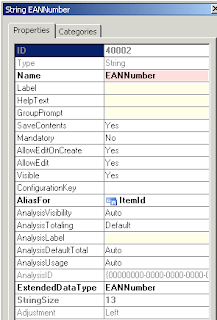
The final thing to do was to set the AliasFor property of the new EAN Number field to be an alias for ItemId, by assigning the value ItemId to the property.


Now "magically" the user is able to type in both item id and EAN number in the Item ID field of e.g. a sales order line, or an item journal etc. to get the item number.

So the AliasFor property can be used to enable the user to use more fields as search keys when directly typing in keys in a field.

Outlook WTF ?

$
0
0
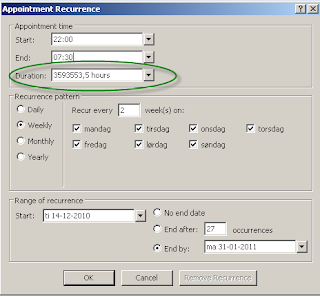
A quick None AX-related post regarding strange software behaviour.

I was booking my wifes work in my calendar.
She works nights right now at a hospital, and I needed this in my calendar, to be able to plan in project work for my studies.
She works night shifts 7 days in a row starting tuesday evening ending monday morning the following week, and this every second week.

I tried to book this using reoccurence, and got an extreme amount of hours.

WTF? :0)

A quick way of dumping records of a table in an xml-file.

$
0
0
A quick way of of dumping table records into a xml-file is to use the kernel method xml, which is present on all instances of a tablebuffer. However, the xml produced by this method is NOT well-formed.

Three problems exists:
  • No header info for the xml-document is written
  • No root node is written
  • The data within tags are not html escaped
When the xml-method is called a call to the GLOBAL class method XMLString method is made.
With a little adjustment to this method we can make the XML data output wellformed.

But first you must add this method to the GLOBAL class:

public static str escapeHTMLChars(str _in)
{
    int x;
    str out;
    for(x=1;x<=strlen(_in);x++)
    {
        if ((char2num(_in,x) < 32) && (char2num(_in,x) > 126))
        {
            out += '&#'+num2str(char2num(_in,x),0,0,0,0)+';';
        }
        else
        {
            out += substr(_in,x,1);
        }
    }
    return out;
}

And now back to the global::XMLString method.
The last code block in the method is a big switch case construct handling all data types in x++. In the string handler section:

case Types::RSTRING:
case Types::VARSTRING:
case Types::STRING:     r += legalXMLString(value);
                        break;


Insert this code just before the break-statement:

r = global::escapeHTMLChars(r);

To call the method mentioned above.
So the code will look like this:

case Types::RSTRING:
case Types::VARSTRING:
case Types::STRING:
                    r += legalXMLString(value);
                    r = global::escapeHTMLChars(r);
                    break;

Now it is possible to write code that:
  1. Writes an xml-header.
  2. Writes a root node tag.
  3. Iterates a table and calls the xml-method on the tablenbuffer. 
  4. Write the end for the root node tag.
static void Job45(Args _args)
{
    query q;
    QueryRun qr;
    AsciiIo f;

    f = new AsciiIo('\\\\axdev2\\e$\\CIT Files\\jas\\mcfly.xml','w');
    if (!f)
        throw error("Argh ! File can not be created.");
    f.writeRaw('');
    // Write root node
    f.writeRaw('');
    q = new Query();
    // Get customer no. 0215

    q.addDataSource(tablenum(CustTable)).addRange(fieldnum(CustTable,AccountNum)).value('0215');
    qr = new QueryRun(q);
    while (qr.next()) {
        f.write(qr.get(tablenum(CustTable)).xml());
    }
    f.writeRaw('');
    f = null;
    // Show xml-file in browser
    winapi::shellExecute('\\\\axdev2\\e$\\CIT Files\\jas\\mcfly.xml');
}


Methods of opening a browser

$
0
0
Mental note to self: Ways of programmatically opening a browser with a webpage in x++:

infolog.urllookup('http://www.fasor.dk');

This will open the standard browser.
Or

WinAPI::shellExecute('iexplore.exe','http://www.fasor.dk');

This specifically opens internetexplorer. The last method can also be used for starting up 3rd party applications from Axapta.

Recursively refreshing any calling forms with ONE method

$
0
0
CASE:
In the project module you can create item requirements for a project (which are basically items you sell via the project). At a customer site, a customized table and form, has been added to the item requirements forms, so the customer is able to set up item specifications for each item requirement, consisting of records with different kinds of data which describes the item.

A class bas been made to import a .csv-file to an set of intermediate tables where data which forms the basis of item requirements and item specifications are stored.

On the item requirements form, you can call a form showing the contents of the intermediate tables and from this form you can then (via a menuitem button) call a class that facilitates population of the item requirements AND item specifications from the itermediate table. When populating the item requirements table based on the intermediate table, you deleted the contents of the intermediate table.

So you have the

Project form calling the
Item Requirements form
calling the Intermediate table form,

from where you perform the population of item requirements and specification.

PROBLEM:
How do you refresh the Item requirements form, and the itermediate table form to show that data has been "moved" from the intermediate form to the item requirements form WITH ONE METHOD CALL.

SOLUTION:
On the class performing the population i added a method that recursively examines the args object to see if the caller is a form, and then call the executequery method on the form datasource:

void doCallingFormsRefresh(Args _args)
{
    FormDataSource fds;
    Args prevLevelArgs;

    // refresh calling form
    if (_args.caller() && _args.dataset() && _args.record().isFormDataSource())
    {
        // Previous level of args (args from caller's caller)
        prevLevelArgs = _args.caller().args();


        fds = _args.record().dataSource();
        fds.executeQuery();


        if (prevLevelArgs && prevLevelArgs.record().TableId != tablenum(ProjTable) && prevLevelArgs.record().isFormDataSource())
        {
            this.doCallingFormsRefresh(prevLevelArgs);
        }
    }
}

Notice that the Projtable form is NOT refreshed.
This way I avoided all the tedious call back methods on the forms, that is normally done.

:)

Axapta & Dynamics ax 4.0 & 2009: Formatting real-controls i AX reports using x++ code PART II

$
0
0
A classic problem with ERP-systems running in multinational enterprises is the formatting of amount fields in a report.

One aspect of this is that the different currencies in which the different national companies of an enterprise operates can vary a lot with regards to number of digits in the amount.


E.g. the exchange rate between a danish kroner and an indonesian rupiah is (at time of writing):

1 DKK - 1524,75 IDR.

This would for an amount of 1 million danish kroner yield an converted amount of 1,524,750,000.75 IDR. An amount of the size can result in the Dynamics AX core returning


Today I was asked by a customer, to come up with a prototype for user enabling the setting of widths of fields on a report


The class that formats Real fields can be found here:


Programmatically accessing a dimension field

$
0
0
The following snippet can be used (in a form) to programmatically toggle mandatory mode on a dimension field (in this case department).
ledgerJournalTrans_DS.object(fieldId2Ext(fieldNum(LedgerJournalTrans,Dimension),1)).mandatory(true);

Videos: Developing in Dynamics 2012

RunBaseBatch inheritance and saving last values chosen in a query

$
0
0

Today I found a little hack that is useful.
I have a (super) class extending RunBaseBatch.
This class build a query on the fly.
This class also implements a dialog, which of course have a select button, so you can input search ranges for the query the class uses.

I have a second (sub) class extending the first (super) class.
Of course the sub-class also uses a query object.

The problem was that when the super class and the sub class instatiates a query on the fly the query is nameless, and therefor execution of the dialog for the query ranges, resulted in the savelast values for the query to become messed up, so that when you ran the sub-class you would get the query ranges from the super-class and vice versa.

A simple solution exists to this problem:
When you instatiate the query object in the and then the queryRun object, you can do:

queryRun.name(this.name());

giving the queryRun object the name of the object instatiated using the super- or subclass.
This seems to keep the query ranges sys last values separate for the two classes.

Dynamics AX 2012 SSRS report - "Report has no design."

$
0
0
I just helped a colleague fix a little problem in Dynamics AX 2012.

He was going through a tutorial to make a (SSRS) report in Dynamics AX 2012.
He had designed the report complete with a dataset getting SalesTable data from AX, and had deployed it to the Report Server.
He had also made a menu item for the report and put that in the menu in AX.

However when he clicked the menu item AX failed to run the report giving the error
"Report has no design."

We poked around using a breakpoint in the Info class, to find that the AX class failing was ReportRun.
The method in ReportRun we ended up in expected to receive a designname.
However as nearly all AX reports are gone and replaced with SSRS reports in Dynamics AX 2012, this lead me to believe that something was up with the menuitem.

We examined the output menu item to find that the ObjectType property was set to "Report" which is a remnant of the old AX reporting system.
We corrected this property to SSRSReport, and voila.
Ax now ran the report with no problems.

Dynamics AX 2012 - how to delete a layer

$
0
0
With the advent of model management in Dynamics AX 2012, Microsoft has gotten rid of the ax.aod files which in previous versions of DAX constituted the layers.
In DAX 2012 adjustments for the meta data model and code are stored in the modelstore in the database.

In previous version deleting a layer containing adjustments to the standard application consisted of delete the ax.aod file and synchronizing and compiling.

How is this done in DAX 2012 ?

The answer is a command-line tool called AxUtil.

To delete e.g. the usr-layer in the application do the following:

1) Shut down all AOS-servers but one (applicable only if you have more than one AOS running).
2) Go to command line interface on the server where the last AOS is running.
3) Go to the folder where DAX's management utilities are placed, e.g.
    C:\Program Files\Microsoft Dynamics AX\60\ManagementUtilities
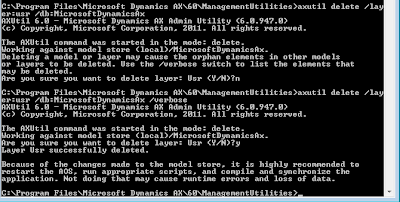
4) Run the Axutil like this:
    Axutil delete /layer: /db:

    To delete the usr-layer in the MicrosoftDynamicsAx database:
    Axutil delete /layer:usr /db:MicrosoftDynamicsAx

    Below an example is shown:
   

5) Restart the AOS
6) Start the DAX client.
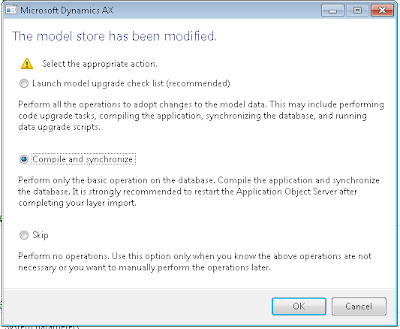
7) In the process of starting up, DAX will detect that something has happened with the modelstore, and prompt you with:


    Choose the action appropriate for your situation.
8) Start the remaining AOSes.


Project accounting 3 - Dynamics AX 2012 - indirect cost / burden

$
0
0
I was tasked with getting an indirect cost setup to work in project accounting 3, but encountered some problems.

Having read the excellent set up guide at http://www.dynamicscare.com/blog/index.php/applying-indirect-burden-costs-to-project-ax-2012-labor-actuals/comment-page-1#comment-3324  (Thanks to Merrie Cosby for this) I proceeded to make the set up according to this guide, but failed to get it working. :(

After some debugging I found that there is an error in the calculation of indirect costs when you run Dynamics AX 2012 in other languages than english.

When setting up Compounding Rules the “Base amount” that you chose, is actually hardcoded in the logic that makes the calculations.

The error can be found in

class PSAIndirectCostCalculation
method calculate:

#define.BaseComponent(‘Base amount’)

This could be corrected so that the define is

#define.BaseComponent(“@SYS73028″)

And the check for the BaseComponent

if (_sId == #BaseComponent)

is changed to

if (_sId == strFmt(#BaseComponent))

Then at least it works in danish language. :0)

Article 7

$
0
0
Mental note to self:
In Dynamics AX releases prior to 2012 to get the company currency you could do:

CompanyInfo::find().CurrencyCode;

In 2012 however you would do:

Ledger::findByLegalEntity(CompanyInfo::find().RecId).AccountingCurrency

Dynamics AX 2012 annoyances (for (old school) developers).

$
0
0

Dynamics AX 2012 annoyances (for (old school) developers).

Sorry about the parathesis.

Having worked with Dynamics AX 2012 way back when it was called Axapta, I remember the days where the IDE had not undergone the Microsoft transition of being more Visual Studio like.
And I long for some of the features I had back then.

Now don't get me wrong I am all for the new possibilities the new IDE and editor gives a developer, but I wish that not all of the nice features we had in the old IDE had been removed in the new one.

Keeping in mind that I will be sounding some of my customers, when they get a brand new AX installation: "That was possible in our old system!". ;0)

Inspired by http://www.annoyances.org/ I decided to blog a little about the annoyances I have found working with Dynamics AX 2012's new IDE.

So the annoyances I have encountered until now are:

No "New form from template" in code projects

The new feature that I expect is there to help us developers produce more uniform forms (no I am not stuttering), called "New form from template" is quite nice. But why is it that you can only call it directly from the AOT-tree ?

When doing a customization to AX I normally start by creating a code project, so I can put the customized elements in one place for tracking reasons. In the code project, you can create groups, that helps you categorize the customized elements like a group form forms and a group for tables etc.
I normally do this too, because I like things to be tidy.

But when trying to use "New form from template" directly from my Form group node in my code project I am annoyed to see, that this feature is missing. So I have to go back to the AOT to create my form using a template, and afterwards drag it back to my code project.

No drag’n’drop of element-names from AOT into code

Sometimes you need to write an init-method which uses a lot of fields from a table.
In the old IDE, you could open a new window, open the datadictionary and the open the fields node in the table you were working with, highlight the fields you wished to use in your code, and drag it to the editor window.
This is unfortunately not possible any more. Not even for type names, class names.

Intellisense

Maybe it's just me and my habits but I actually miss the function keys from the old IDE, which could give you a list of say tables, or EDT's directly in the editor-window where you could quickly find what you needed.

Now you actually have to know what the element you are looking for is called and start typing that and so Intellisense will help you. I like Intellisense, but I would just looove a combination of the two.

CTRL+O on tables - just not system tables

It's great that you can open a table browser on a table using CTRL+O, quick and easy. Nice.
But why is it not possible to do the same on system tables ?


These were four little things that often annoys me in the Dynamics AX 2012 IDE.

UPDATE - regarding Intellisense.

I actually have an example where the old school ways of drag'n'drop of element from the AOT to the editor, og the shortcut key showing the tablenames and their fields would come in very handy, because of the short comings of Intellisense in the AX IDE.

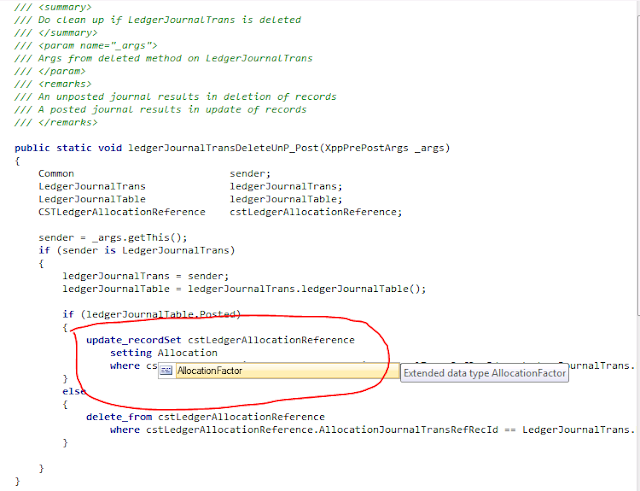
If you write an update_recordset command in you code then Intellisense is not able to help your determine which field you want to use in the setting-clause.

In the example shown below I need to be able to see what field in the cstLedgerAllocationReference table that I want to be update, but Intellisense is not very helpful. (The field in this example is called AllocationJournalTransRefRecid). So I have to open another AOT, go to the datadictionary / Tables, find the right table, expand the fields nodes to see what the field is called, which is more time consuming - and annoying - than just pressing F2 or having the Intellisense function properly.
Mental note to self: AIF changes -> Incremental CIL build.

$
0
0
After using a couple of hours trying to understand why my newly created AIF-service was not doing exactly was it was supposed to do, I found the solution.

My AIF service uses a new table to accept some value from an external system.
When a record is introduced into this table, a new ledger journal with a ledger journal line is created, and the voucher the line gets in the journal line, is updated onto my new table.

This to allow for making it possible to use customized code in an AIF service, without having to make changes to the table methods of the Generel ledger journal tables and without risking custmized code made in the Service classes being overwritten by a service wizard update of the service.

I had completed and activated my service, and was testing it.
Then I discovered that I had forgotten to call the code to create the ledger journal, on my new table's insert-method, therefor I got records in my table, but no ledger journal.

So I quickly inserted the call to the method, and tested again.
Still no general journal generated. :(

After pondering this I decided to deactivated the service and try to activate som logging, to see what was going on, and then reactivate it.

And voila, now I got my general ledger journals.
The activation of my service had of course built new CIL-code.

Conclusion:

REMEMBER to ALWAYS incrementally build CIL-code, when you change ANYTHING in AX, that is used in an AIF service.
Viewing all 54 articles
Browse latest View live